
 Software Development
 Security Services
 Cloud Services
 AI Services
 Other Services















 TechMagic Academy


How to Integrate CI/CD Vulnerability Scanning into Your Pipeline Without Slowing Down Delivery
Last updated:7 January 2026


Fast delivery has become the default. But so has constant security pressure. Teams are expected to ship multiple times a day while also proving that nothing risky slips through. At the same time, many security checks fail to build for issues that engineers cannot act on quickly.
That tension is why CI/CD vulnerability scanning often feels like a blocker instead of a safeguard.
In our new article, we explain how to change that. We show how to integrate vulnerability scanning into CI/CD pipeline workflows in a way that matches how modern pipelines actually run. You’ll learn which types of scans belong in CI/CD, where each scan delivers the most value and leads to enhanced security posture, and how stage-based placement keeps feedback fast and reliable.
We also discuss common causes of pipeline slowdowns we saw in our practice, and the metrics that reveal whether security supports delivery or quietly holds it back.
Key takeaways
- Only fast, deterministic, and actionable scans belong in the main CI/CD path and security posture, helping to strengthen the pipeline's security posture.
- They help identify vulnerabilities early, create strict access controls, strengthen production environments, and control third-party components’ security.
- Stage-based placement reduces noise and insufficient flow control mechanisms, enabling the identification of potential security risks early in the pipeline while preserving security coverage.
- Clear fail/pass policies prevent alert fatigue and inconsistent decisions during the software development process.
- Most pipeline slowdowns come from poor scan placement and untuned results, not from scanning itself.
- The right metrics show whether security improves delivery outcomes instead of slowing them down. They are also essential for compliance and audit readiness.
What Types of Vulnerability Scanning Are Relevant for CI/CD Pipelines?
Only security scans that are fast, deterministic, and actionable belong in CI/CD pipelines. Their goal is to catch issues and security concerns that developers can fix immediately, without slowing down builds or requiring production context.
Integrating a variety of security tools into the CI/CD pipeline helps protect the complete software delivery pipeline from code commit to production deployment. This is the essence of managed DevOps services.
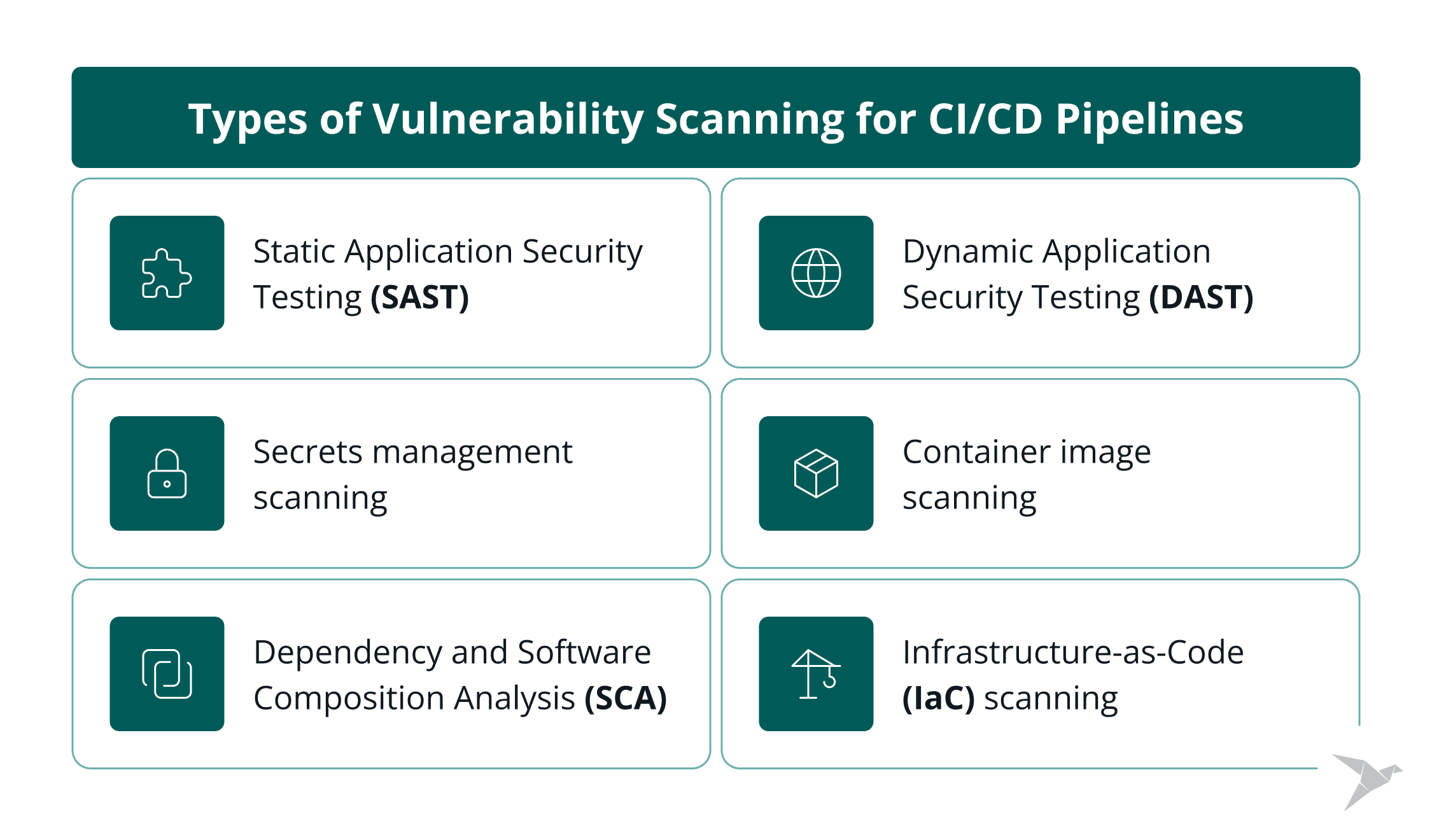
Below, you can see the CI/CD vulnerability scanning types that we use in practice. They align with how CI/CD pipelines operate: frequent changes, tight feedback loops, and limited execution time. Heavier, environment-dependent testing still matters, but it is more effective when handled outside the pipeline.
Static Application Security Testing (SAST)
Static Application Security Testing is one of the most significant parts of application security as a service. It belongs in CI/CD because it analyzes source code early and does not require a running application.
SAST is a “white-box” method that scans source code, bytecode, or binaries to detect common vulnerability patterns such as injection flaws, insecure data handling, and unsafe API usage. Since it runs on every commit or pull request, it helps catch issues before they propagate downstream.
What it’s good for:
- early detection;
- developer feedback;
- shift-left security.
Limitations: False positives, alert fatigue, and no runtime context.
Dynamic Application Security Testing (DAST)
Dynamic Application Security Testing only partially belongs in CI/CD and should be used selectively. DAST scans a running application by simulating external attacks. While useful, it is slower and depends on stable test environments. Full DAST suites are better suited for staging or scheduled testing rather than every pipeline run.
What it’s good for:
- runtime vulnerability detection;
- authentication and authorization issues.
Limitations: It has a longer execution time and environment-dependent results.
Dependency and Software Composition Analysis (SCA)
Dependency changes happen frequently and need continuous monitoring. Software Composition Analysis scans third-party libraries and open-source components for known vulnerabilities and licensing risks.
SCA tools check application dependencies for known vulnerabilities and licensing issues, helping manage supply chain risks and ensuring application security within CI/CD pipelines. It tracks direct and transitive dependencies against public vulnerability databases (CVEs).
What it’s good for:
- supply chain visibility;
- known vulnerability detection.
Limitations: The security scanning does not detect custom code flaws and relies on disclosed CVEs.
Container image scanning
Container image scanning belongs in CI/CD when images are built as part of the pipeline. These scans inspect container images for vulnerable OS packages, outdated libraries, and insecure configurations. It is good practice to run them before pushing images to a registry to prevent known issues from reaching runtime environments.
What it’s good for:
- preventing vulnerable images;
- standardized environments.
Limitations: You have no visibility into runtime behavior, and image size impacts scan time.
Secrets management scanning
Credential exposure often happens during commits. Secrets scanners detect hardcoded secrets such as API keys, tokens, and private keys using pattern matching and entropy analysis. Blocking commits with exposed secrets reduces incident response work later.
What it’s good for:
- preventing credential leaks;
- enforcing secure development practices.
Limitations: You may get false positives for high-entropy strings; scans cannot rotate leaked secrets automatically.
Infrastructure-as-Code (IaC) scanning
Infrastructure changes are code changes. IaC scanners analyze Terraform, CloudFormation, ARM, or Kubernetes manifests for misconfigurations such as overly permissive access, exposed services, or missing encryption settings.
What it’s good for:
- preventing misconfigurations;
- enforcing cloud security baselines.
Limitations: You have no visibility into live drift, scans require security policy tuning.
We are here to help
Where Exactly Should Vulnerability Scanning Be Placed in the CI/CD Workflow?
Below is a stage-based placement model that reflects how we run scans in real pipelines. Integrating security scanning into the development workflow enhances efficiency, collaboration, and overall security posture. Security scanning usually starts when developers push code changes to the repository.
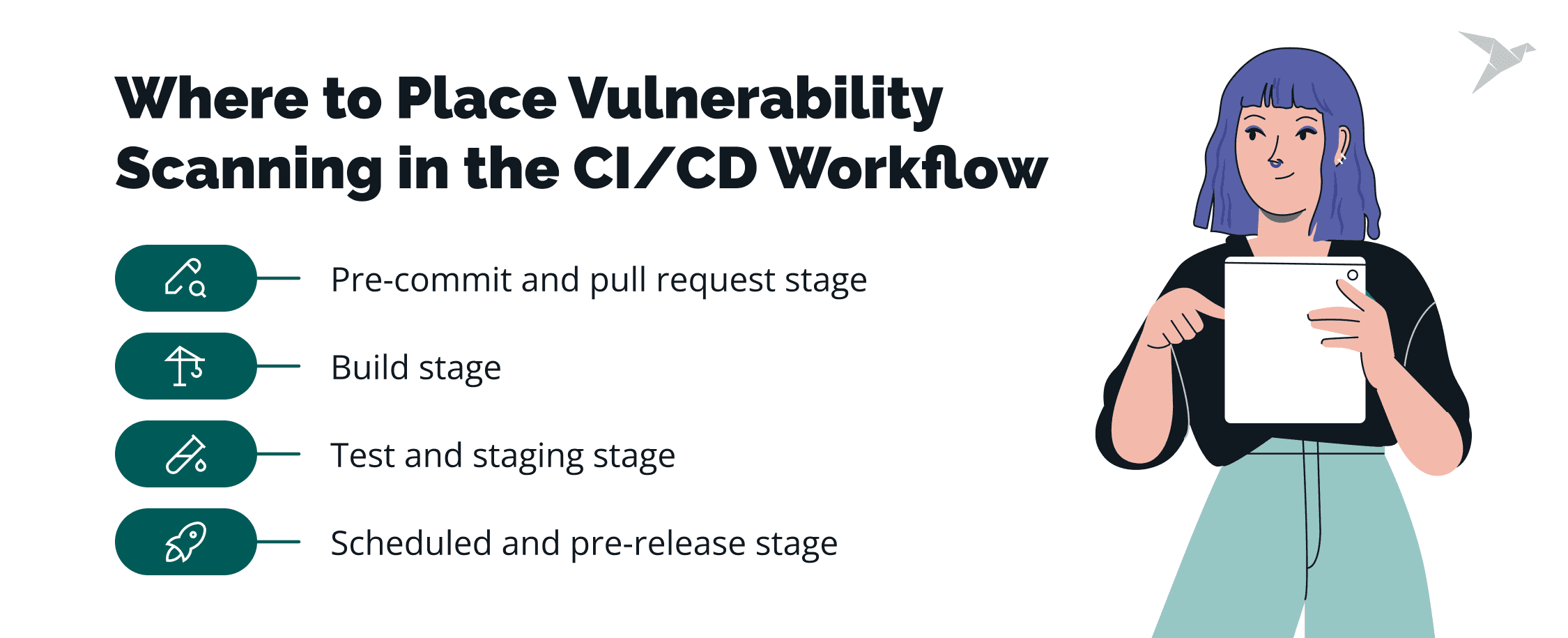
Pre-commit and pull request stage
This stage should focus on fast checks that prevent obvious issues from entering the codebase and support secure coding practices. Using pre-commit hooks at this stage helps enforce security policies before code is committed, catching vulnerabilities and secrets early by integrating with IDEs and source code management platforms. Setting security scanning gates at this point ensures that critical vulnerabilities are identified before code reaches production.
Typical scans at this stage are
- secret scanning;
- lightweight SAST rules;
- basic IaC validation.
At this point, we design scans to give engineers immediate feedback while changes are still easy to fix. Because they run quickly and rely only on local context, they add very little overhead to the pipeline and rarely produce noisy or ambiguous results. This makes them effective gatekeepers early in the development process, stopping high-impact mistakes before they move further downstream.
Build stage
The build stage is where most code and dependency-related scanning belongs, especially in active software development workflows.
Typical scans at this stage are
- full SAST;
- dependency and SCA scanning;
- container image scanning.
At this point, the pipeline works with a concrete artifact, which makes scan results more accurate and repeatable. Running these scans during the build enforces security best practices without interrupting developer flow, since the feedback aligns directly with what is being packaged and deployed rather than with intermediate code states.
Test and staging stage
This stage is suitable for scans that require a running application and more context.
Typical scans at this stage are
- targeted DAST;
- API security testing;
- configuration validation.
Because these scans depend on environmental stability and take longer to complete, running them earlier would slow down feedback and increase flakiness. Placing them in test or staging environments preserves effective CI/CD security while keeping day-to-day pipeline execution predictable and efficient.
Scheduled and pre-release stage
Some scans provide value through depth rather than speed and should run on a schedule.
Typical scans at this stage are
- full DAST suites;
- broad attack surface discovery;
- regression security testing.
Running these scans outside the main commit path avoids blocking engineers while still exposing broader security risks that emerge over time. Scheduled execution also makes it easier to compare results across runs and identify systemic issues that are not tied to individual changes.
Why does stage-based scanning work?
In an ideal case, each scan runs where it yields the most signal at the lowest cost. Running every scan on every commit increases execution time, creates noise, and slows down feedback without improving coverage.
On the contrary, placing scans where they fit best reduces total pipeline execution time while preserving coverage. Engineers get fast feedback when it matters, and deeper testing runs when time and context allow.
This structure aligns security controls with how pipelines actually operate, rather than forcing every scan into every step.
How to Integrate Vulnerability Scanning into Your CI/CD Pipeline?
Vulnerability scanning works best when it follows the structure of the pipeline rather than forcing security checks into every step. The process below reflects how teams typically approach how to integrate vulnerability scanning into CI/CD without disrupting delivery or creating unnecessary noise.
Define what must block the pipeline
Start by deciding which findings should stop a build and which should only be reported. Blocking rules should focus on high-confidence, high-impact issues that engineers can fix immediately.
This keeps the pipeline predictable and avoids alert fatigue caused by low-priority findings that do not affect deployability. Clear decision rules at this stage prevent inconsistent enforcement later.
Map each scan to a pipeline stage
Each scan should run where it produces reliable results with minimal execution cost. Code and dependency scans fit naturally in early stages, while environment-dependent scans belong later or run on a schedule.
This mapping step ensures that teams integrate vulnerability scanning into CI/CD in a way that matches how artifacts are built, tested, and deployed, instead of treating security as a separate workflow.
Automate scans as pipeline jobs
Scans should run automatically as part of the pipeline, not as manual steps or optional checks. Automate vulnerability scanning in CI/CD pipeline to ensure consistent execution across teams and repositories, and it removes reliance on individual discipline.
At this stage, scanning becomes a default behavior rather than a special activity, which improves coverage without adding process overhead.
Tune results before enforcing gates
Initial scan results often include false positives or findings that are not relevant to the application context. These may include various security flaws that need to be filtered and prioritized. Before enforcing hard pipeline failures, teams should review results, tune rules, and suppress known noise.
This tuning phase makes enforcement sustainable and prevents developers from bypassing controls to keep work moving.
Add feedback loops for developers
Scan results should be surfaced where developers already work, such as pull requests or build logs. Feedback needs to be clear enough to explain what failed and why, without requiring security expertise to interpret the output.
Fast, understandable feedback shortens remediation time and keeps security aligned with daily engineering workflows.
Review and adjust as the pipeline evolves
CI/CD pipelines change as systems grow, architectures shift, and delivery speed increases. Scanning logic and enforcement rules should be reviewed regularly to stay aligned with actual risk and pipeline performance.
This ongoing adjustment closes the loop and keeps security controls relevant instead of static.
CyberSecurity services for Elements.Cloud
What Are Best Practices for Defining Fail/Pass Policies in CI/CD Security Scans?
Fail/pass policies work best when they are driven by clear security intent and enforced automatically. Rigid blocking rules slow delivery, while undefined rules lead to inconsistent decisions. Policy-driven gatekeeping balances risk and velocity by making enforcement predictable and explainable.
Use severity thresholds for blocking decisions
Blocking rules should focus on Critical and High severity findings that represent clear and actionable risk. Lower-severity issues are better handled through reporting and backlog tracking rather than immediate pipeline failure.
Severity-based thresholds reduce noise and keep pipelines focused on issues that matter most during active delivery.
Apply environment-based policies
Fail/pass rules should vary by environment to reflect different risk tolerance. Development pipelines benefit from flexible policies that favor feedback, while production pipelines require stricter enforcement.
Environment-aware policies allow teams to test changes quickly without weakening controls where stability and exposure matter most.
Support time-bound exceptions
Some findings require temporary exceptions due to operational constraints or external dependencies. These exceptions should always have an expiration date and a documented owner.
Time-bound exceptions prevent permanent policy drift and ensure that accepted risk is reviewed rather than forgotten.
Align policies with business risk
Security gates should reflect real business impact, not abstract technical severity. A vulnerability that affects sensitive data or core services deserves stronger enforcement than one in an isolated or low-impact component.
Linking policies to business risk helps engineering teams and security specialists make consistent decisions and justify trade-offs when delivery pressure is high.
Automate policy enforcement
Fail/pass decisions should be enforced through policy logic rather than hardcoded rules in individual pipelines. Centralized policies make enforcement consistent across teams and easier to update as risk models change.
Automation ensures that decisions are applied uniformly, without relying on manual judgment during deployments.
Why Does Vulnerability Scanning Often Slow Down CI/CD Pipelines?
Vulnerability scanning slows down pipelines when it is added without regard for pipeline structure, execution cost, or decision logic. The bottlenecks usually come from how scanning is implemented and governed, not from the scans themselves.
Scans are triggered too frequently
Running every scan on every commit increases execution time without improving coverage. Many scans analyze the same unchanged code or artifacts repeatedly, which adds latency with no new signal.
When the scan frequency is not aligned with what actually changes, pipelines become slower while results stay the same.
Scans are placed in the wrong stages
Some scans require a stable environment, runtime context, or a fully built artifact. Placing them in early stages forces the pipeline to wait for conditions that are not yet met.
Incorrect placement increases retries, flakiness, and unnecessary blocking during normal development workflows.
Results are not tuned or prioritized
Untuned scans often produce large volumes of low-impact findings. When pipelines block on these results, developers spend time triaging noise instead of fixing real issues.
Lack of prioritization turns scanning into a review bottleneck rather than a safety net.
Fail/pass logic is unclear or inconsistent
Pipelines slow down when teams are unsure which findings matter and who decides whether a build can proceed. Manual reviews and ad hoc approvals introduce delays that automation was meant to eliminate.
Clear, policy-driven rules reduce hesitation and keep pipelines moving.
Ownership is fragmented
When security, platform, and development teams each control parts of the scanning process, changes take longer to coordinate. Adjusting thresholds, fixing false positives, or updating policies becomes slow and reactive.
Clear ownership and shared responsibility help scanning evolve with the pipeline instead of blocking it.
Scanning is treated as a one-time setup
Pipelines change over time, but scanning configurations often remain static. As execution paths grow and environments diversify, outdated scanning logic adds friction and unnecessary work.
Regular review keeps scanning aligned with current delivery patterns and prevents gradual slowdowns.
Vulnerability scanning becomes a bottleneck when it ignores pipeline dynamics. When placement, frequency, and enforcement are aligned with how CI/CD actually operates, scanning supports delivery instead of slowing it down.
What Metrics Should You Track to Ensure Security Does Not Slow Down Delivery?
For engineering leadership, the right metrics show whether vulnerability scanning reduces risk without disrupting delivery. These indicators focus on speed, signal quality, and operational impact rather than raw scan volume.
Track pipeline execution time
Pipeline execution time shows the direct cost of security scanning. Measuring how long pipelines run before and after introducing scans makes slowdowns visible and actionable.
This metric helps teams identify which stages introduce latency and whether scan placement aligns with pipeline flow.
Measure vulnerability remediation time
Vulnerability remediation time reflects how quickly teams can act on scan results. Long remediation cycles often indicate unclear ownership, poor feedback quality, or excessive noise. Short remediation times suggest that findings are relevant, understandable, and properly prioritized.
Monitor the false positive rate
The false positive rate indicates how much effort engineers spend reviewing issues that do not require action. A high rate slows delivery even when pipelines do not technically fail. Reducing false positives improves trust in scan results and keeps attention on real risk.
Observe deployment frequency impact
Deployment frequency shows whether security controls affect release cadence. A noticeable drop after introducing or tightening scanning rules signals over-enforcement or poor tuning. Stable deployment frequency suggests that scanning integrates cleanly with delivery workflows.
Track policy override and exception usage
Policy overrides and exceptions reveal whether fail/pass rules match real-world constraints. Frequent or long-lived exceptions often indicate misaligned thresholds or unclear risk models. Tracking this metric helps teams refine policies before they become blockers.
Measure scan-to-fix success rate
Scan-to-fix success rate shows how often identified issues are actually resolved rather than deferred or ignored. Low rates point to findings that lack context or clear remediation guidance. High success rates indicate that scanning produces actionable outcomes without disrupting delivery.
Metrics that capture exception usage and scan-to-fix outcomes provide context that raw speed and volume metrics cannot. Together, these indicators give leadership a clear view of whether security supports delivery or quietly slows it down.

What Common Mistakes Should Be Avoided When Integrating Vulnerability Scanning?
Teams rarely struggle with vulnerability scanning because of missing tools. Most problems come from implementation choices that ignore pipeline dynamics, engineering workflows, and decision ownership. These mistakes consistently lead to slow pipelines, low trust in results, and unresolved risk.
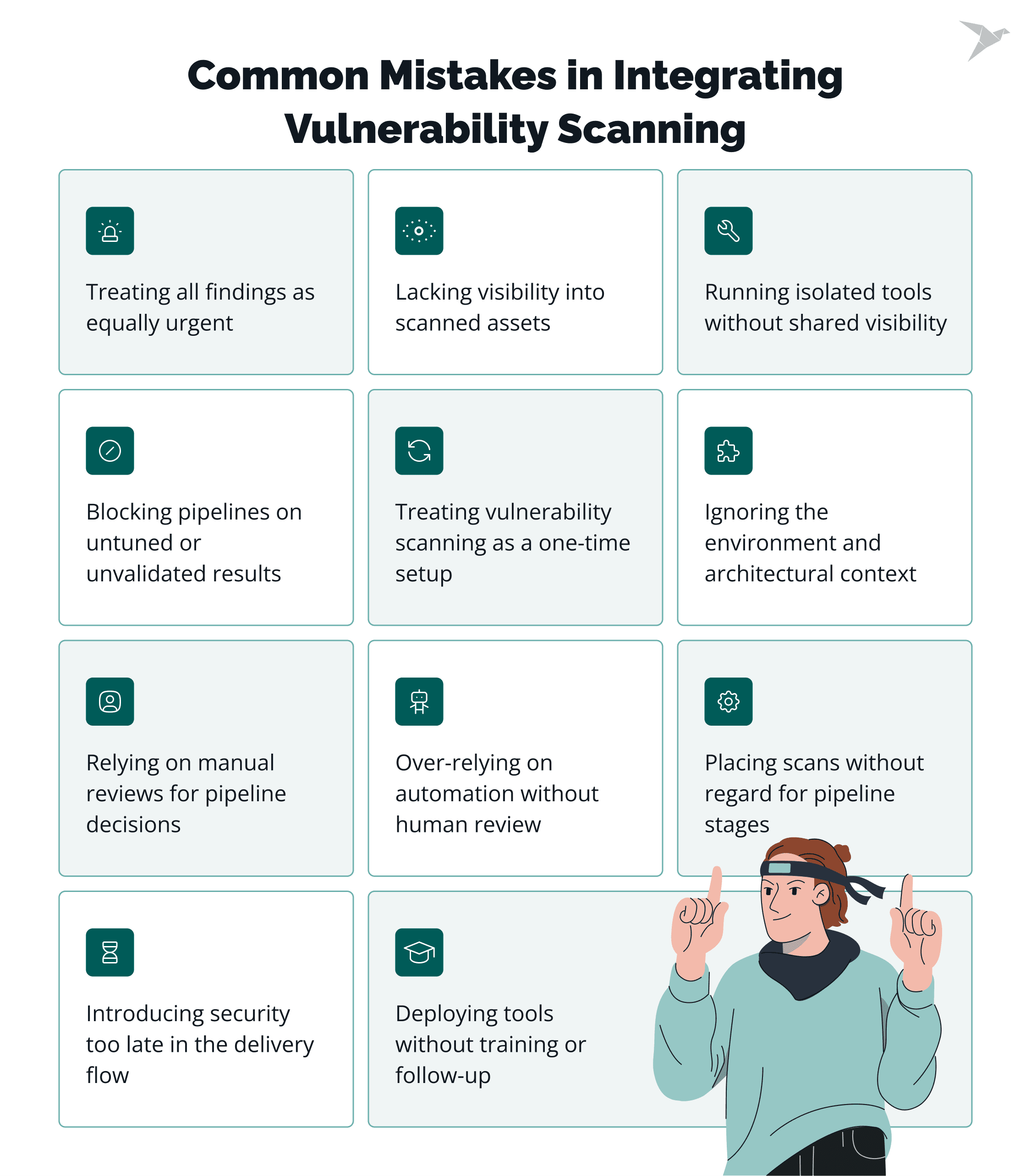
Treating all findings as equally urgent
Using vulnerability severity alone, often based on base CVSS scores, leads to poor prioritization. Issues with the same score can have very different impacts depending on exposure, asset criticality, and deployment context.
When pipelines block without context, teams waste time on low-impact findings while higher-risk paths remain unaddressed.
Blocking pipelines on untuned or unvalidated results
Enforcing hard failures before tuning scan output creates friction early. False positives and low-confidence findings quickly erode trust in pipeline controls.
Once developers see builds fail for issues they cannot fix or reproduce, they start bypassing security checks.
Placing scans without regard for pipeline stages
Adding scans wherever they technically fit, rather than where they make sense, increases execution time and instability. Runtime-dependent scans placed too early cause flakiness and retries. Incorrect placement turns security checks into bottlenecks instead of safeguards.
Lacking visibility into scanned assets
Incomplete or outdated asset inventories create blind spots in CI/CD pipelines. When teams are unclear about which services, images, or environments are covered, scan results lose meaning. This leads to false confidence while critical assets remain unmonitored.
Treating vulnerability scanning as a one-time setup
Pipelines evolve, but scanning configurations often remain static. New services, dependencies, and deployment paths introduce risks that outdated rules fail to detect. Without continuous adjustment, scanning slowly loses relevance and effectiveness.
Ignoring the environment and architectural context
Scan results without context produce misleading outcomes. Network topology, compensating controls, and runtime protections affect exploitability, but generic scans do not account for them. This results in false positives, missed risks, or enforcement decisions that do not reflect real exposure.
Relying on manual reviews for pipeline decisions
Manual approvals reintroduce delays that CI/CD pipelines are designed to eliminate. Decisions become inconsistent and depend on availability rather than risk. Without policy-driven automation, security gates slow down delivery instead of supporting it.
Running isolated tools without shared visibility
Using standalone scanners that do not share data fragments visibility across the pipeline. Engineers see partial results, while leadership lacks a clear picture of overall risk. Disconnected tools increase effort and reduce the effectiveness of prioritization.
Over-relying on automation without human review
Automation is necessary for scale, but it cannot replace judgment. Without periodic review, pipelines accumulate noise, exceptions become permanent, and policies drift. Human checkpoints are required to keep automated scanning accurate and actionable.
Introducing security too late in the delivery flow
Scanning only during testing or before release makes remediation slower and more expensive. Issues found late are harder to fix and more likely to be deferred. Early-stage scanning reduces rework and stabilizes delivery timelines.
Deploying tools without training or follow-up
Without proper enablement, scan results are misunderstood or ignored. When remediation is not tracked, the same issues reappear across releases. Effective scanning requires both technical integration and operational ownership.
Wrapping Up: Where Vulnerability Scanning in CI/CD is Heading
Vulnerability scanning in CI/CD is maturing from a tooling problem into an engineering discipline. Teams that align scans with pipeline stages, automate decisions through policy, and continuously tune for signal will improve security without sacrificing speed. Those that do not will continue to fight slow pipelines, low trust, and unresolved risk.
Vulnerability scanning will become more context-driven and policy-led
The main shift ahead is from generic severity-based scanning to context-aware decision-making. Teams are already moving away from treating CVSS scores as the absolute truth and toward policies that account for asset criticality, exposure, environment, and business impact.
In practice, this means CI/CD pipelines will rely more on centralized policy engines and less on hardcoded rules. Security decisions will increasingly be expressed as policy logic that can adapt as systems change, rather than static thresholds embedded in individual pipelines, including in configuration files and across the development lifecycle.
CI/CD pipelines will favor fewer scans with higher signal
As pipelines continue to accelerate, teams will reduce the number of scans that run on every commit. Instead, they will focus on scans that are fast, deterministic, and produce consistently actionable results across code repositories and version control systems.
Heavier and exploratory testing will not disappear, but it will continue to move toward scheduled, pre-release, or continuous monitoring workflows. This separation allows teams to maintain coverage without turning pipelines into bottlenecks, while integrating security into the development lifecycle and strengthening security practices.
Security tooling will shift toward integration, not expansion
Adding more standalone scanners rarely improves outcomes. The trend is toward fewer tools that share context, results, and ownership across the pipeline, rather than just adding security scanning without a plan.
Integrated data flows between code scanning, dependency analysis, infrastructure scanning, and runtime signals will improve prioritization and reduce duplicated effort. This approach already underpins many modern DevSecOps services, where security is embedded into delivery workflows rather than added as a separate layer, supporting stronger security measures and reducing the likelihood of security breaches.
Automation will remain essential, but human oversight will stay critical
Automation will continue to scale vulnerability scanning, but fully autonomous security decisions remain unrealistic. Pipelines will increasingly combine automated enforcement with defined human checkpoints for tuning, exception handling, and security policy review to enforce security policies.
Teams that balance automation with ownership and review will avoid alert fatigue while keeping controls aligned with real-world risk, preventing compliance violations, and reducing gaps that could lead to cross-site scripting.
Security success will be measured by delivery outcomes, not scan volume
The most important trend is how success is measured. Leadership is moving away from counting vulnerabilities and toward tracking delivery impact, remediation speed, exception usage, and deployment stability.
Vulnerability scanning that supports delivery, rather than slowing it down, will become the baseline expectation rather than a differentiator.

FAQ
Vulnerability scanning in a CI/CD pipeline is the automated process of checking code, dependencies, images, and infrastructure definitions for known security issues as part of the delivery workflow in modern software development. The goal is to detect issues early, provide fast feedback to engineers, and prevent high-risk problems from reaching later stages of deployment, including critical vulnerabilities and other security threats.
When done correctly, vulnerability scanning integrated into CI/CD runs continuously and aligns with how software is built and released through continuous integration, rather than operating as a separate security activity. These automated security checks support proper security controls and help improve security awareness across engineering and security teams.
CI-based vulnerability scanning focuses on changes introduced during development. It typically analyzes source code, dependencies, secrets, and infrastructure definitions before artifacts are built or merged. These scans are optimized for speed and frequent execution, reducing the risk that malicious code slips into the codebase.
CD-based vulnerability scanning runs after artifacts are built and environments are available. It often includes runtime-aware checks such as DAST or configuration validation. These scans provide deeper context but take longer and are better suited for staging, pre-release, or scheduled execution, helping teams identify security threats that could allow attackers to gain unauthorized access.
Pipeline time stays predictable when scans are placed where they provide the most value. Fast, deterministic scans should run on commits and pull requests, while heavier scans should run later or on a schedule, balancing automated security checks with manual code reviews when needed.
PTuning results, limiting blocking rules to high-impact findings, and avoiding repeated scans of unchanged artifacts also help prevent unnecessary delays and security incidents, while keeping proper security controls in place for security teams.
Automated scanning works best for issues that are well-defined and consistently detectable. This includes common code-level flaws, known vulnerable dependencies, exposed secrets, insecure container packages, and misconfigurations in infrastructure code, especially those linked to critical vulnerabilities.
Security vulnerabilities that require deep business context or complex attack paths are better handled through targeted testing and periodic reviews rather than automated pipeline gates, alongside security awareness efforts to reduce overall security threats. Continuous security requires human oversight.