














Security Application Testing: Defend Web Application With Automated Tools
Last updated:4 March 2025

Cybercriminals frequently target web applications seeking to exploit vulnerabilities and gain access to sensitive data or system resources. A successful attack on an application can lead to data breaches, system downtime, and reputational damage for the affected organization.
Web applications are a favorite target. Attackers probe them for vulnerabilities that open the door to sensitive data or system resources, and a single successful one can mean a data breach, downtime, and lasting reputational damage. The attacks keep getting more sophisticated, too. The numbers below make the case better than we can: effective security testing of web applications has never mattered more.
In 2024, Claranet identified 2,570 instances of reflected and stored cross-site scripting (XSS) vulnerabilities across approximately 500 web apps. The same study found 1,032 instances where outdated JavaScript libraries were used, highlighting a common avenue for potential exploits.
Cloudflare reported a 93% annual increase in application-layer HTTP DDoS attacks in early 2024. These attacks accounted for 37.1% of all mitigated application traffic during this period. In October 2024, over 287 malicious packages were published on the Node Package Manager platform. These packages employed typosquatting techniques to deceive developers into downloading compromised code, posing significant risks to software supply chains.
As for the AI-driven attacks, BT observed a 1,200% increase in malicious scanning bots over the past year, attributing this surge to cybercriminals implementing AI to automate and enhance their attack strategies (for example, automated phishing campaigns or AI-powered malware). Furthermore, the average cost of a data breach caused by a web application vulnerability reached $4.33 million, according to IBM's report. Put together, those numbers point one way. Organizations need steady security measures: regular vulnerability assessments, prompt updates to software components, and automated security testing tools working to keep web applications ahead of the threats.
While it is recommended to conduct regular penetration tests that help to ensure that your application does not contain any exploitable security flaws, automated application security testing could help you find and mitigate common security vulnerabilities in the early stages of the software development lifecycle (SDLC).
Many different tools and approaches can be used to set up an automated security testing flow, and it is important to choose the right options that would be the best match for your project. This article will give you the most useful advice, tools, and insights into the topic. Let's begin!
Understanding Web Application Security Testing
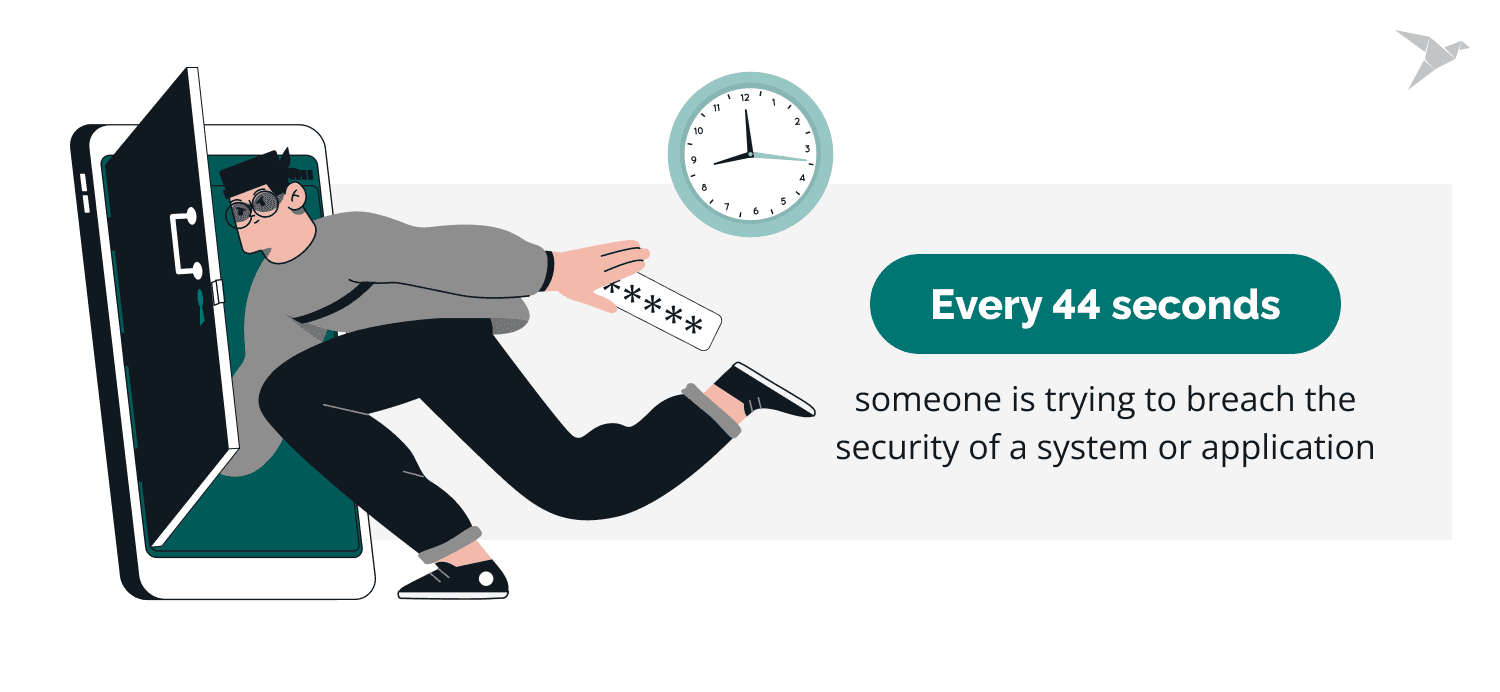
Every 44 seconds, a system or application faces a security breach attempt. According to Security Magazine, there are 2,200 cyberattacks daily, affecting over 800,000 people each year. With cyber threats becoming more frequent and sophisticated, relying solely on manual security measures is no longer an option. This is where automated security testing tools become essential.
Web application security testing (AST) is how you evaluate an app's security by finding its vulnerabilities, weaknesses, and likely threats. That means examining the code, the configuration, and the runtime behavior to see whether it holds up against an attack. Static and dynamic analysis, penetration testing, and automated vulnerability scanning each surface flaws before an attacker can reach them.
Security testing belongs inside the development lifecycle from the start, so risks surface early. Automated tools take the manual grind out of it and keep the assessments consistent. And alongside web testing, a mobile application security testing checklist catches the vulnerabilities specific to mobile apps and extends coverage across platforms.
Check our professional pentesting services

Benefits of Automated Security Testing
Automated security testing enhances efficiency, accuracy, and overall security posture compared to manual testing. Here are the key benefits, supported by real statistics:
Efficiency
Security testing automation accelerates vulnerability detection and resolution. 44% of IT companies have integrated automation into at least half of their testing processes, highlighting its growing adoption, according to RWS. Automation tools scan applications quickly and accurately, reducing the time developers spend identifying and fixing security issues.
Consistency
Automated security tools apply standardized testing procedures across all code changes. Regular scans ensure that security weaknesses are consistently monitored and addressed. In their article, Qualysec mentioned that 70% of security professionals analyze more than ten notifications daily, with 78% spending over 10 minutes reviewing each alert, which demonstrates the need for reliable automation.
Cost-effectiveness
Security automation significantly lowers financial risks. A study by IBM reported that organizations using AI-driven security testing experience an average cost reduction of $3.58 million per data breach compared to those relying solely on manual efforts. Automating security processes reduces incident response costs, security-related downtime, and the need for extensive manual testing.
Repeatability
Security automation eliminates inconsistencies caused by human error, ensuring that every test follows the same structured process. An IDC report found that developers spend an average of 19% of their weekly hours on security-related tasks, often outside regular working hours. Automated testing reduces this burden and improves reliability.
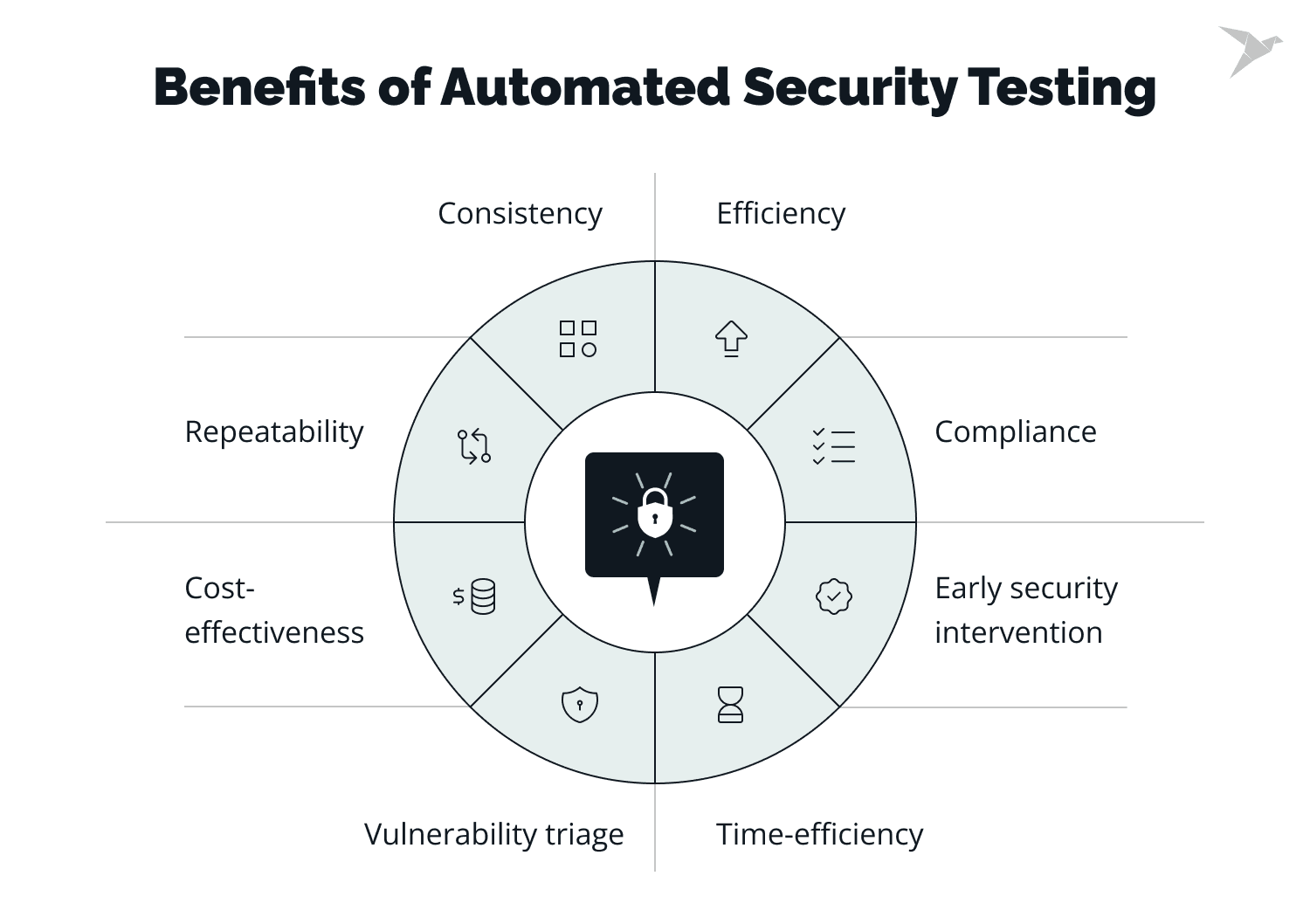
Compliance
Security automation simplifies compliance with industry regulations such as GDPR, HIPAA, and PCI DSS. Automation tools apply security policies consistently, reducing the risk of non-compliance penalties and protecting sensitive data. According to Drata, 91% of companies plan to implement continuous compliance within the next five years, which highlights the growing importance of automated security measures.
Time-efficiency
Manual testing remains a major bottleneck in software development. Automated testing optimizes this process, allowing teams to focus on high-priority security concerns. QualySec concluded that 83% of security personnel report experiencing alert fatigue, which emphasizes the need for automation tools to streamline security workflows.
Early security intervention
Vulnerabilities detection during development prevents costly security breaches. Automated testing integrates into the software development lifecycle (SDLC) and detects threats before exposure. According to McKinsey's Global Survey on AI, 65% of organizations now use generative AI for security, nearly doubling in the last ten months. This increase underscores the shift toward proactive security safeguards.
Vulnerability triage
Automated tools prioritize security vulnerabilities based on severity, helping teams address the most critical threats first. A structured triage process minimizes risks by ensuring that high-priority vulnerabilities are handled immediately. According to Drata, 74% of organizations report struggling to properly address vulnerabilities due to limited budgets and resources. This fact makes automation essential for efficient security management.
Different Types of Security Testing for Web Applications
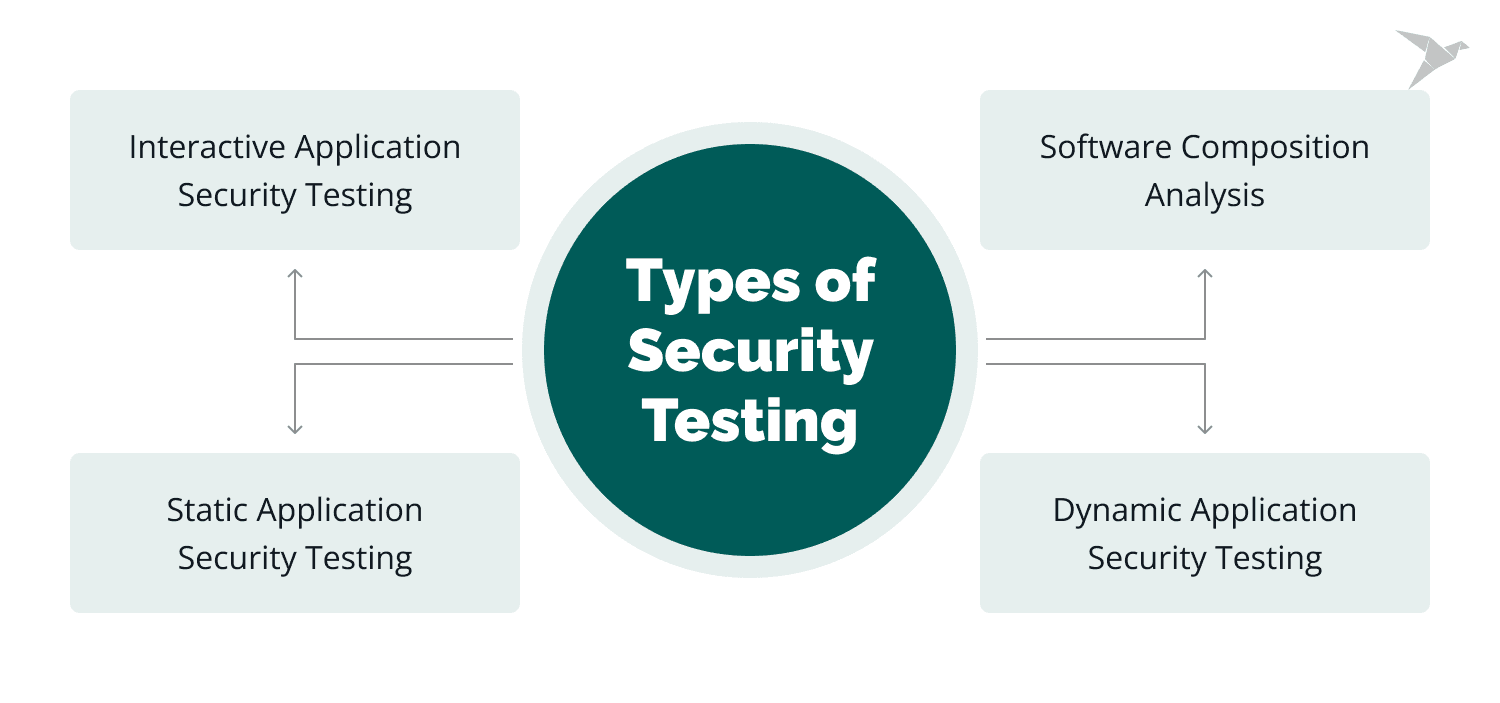
Automated testing uses software tools to find and report vulnerabilities. There are several kinds, and each has its strengths and its blind spots.
Interactive application security testing
Interactive application security testing (IAST) borrows from both static and dynamic testing. It instruments the app and watches its behavior while it runs, which lets it catch weaknesses neither SAST nor DAST would find on its own.
Software composition analysis
Composition analysis (SCA) looks at the third-party components an app pulls in. These tools flag known vulnerabilities in open-source libraries and frameworks, and they catch the licensing problems those components can drag along too.
Static application security testing (SAST)
SAST reads the source code itself, hunting for the common coding mistakes: buffer overflows, SQL injection, XSS. Because it works on code, you can fold it into the SDLC and fix issues while they're still early and cheap.
Dynamic application security testing (DAST)
DAST comes at the running application from the outside, simulating real attacks to find flaws in how it behaves. It catches things SAST can't, like broken authentication, authorization gaps, and configuration errors.
Today, we will focus on dynamic security testing and software composition analysis and reveal major tools in these areas.
To gain insight into our approach, read the case study

Dynamic Application Security Testing
DAST aims to simulate attacks and identify potential vulnerabilities in a system by treating it as a whole. Vulnerability scanners can automate testing by checking for known risks in applications and networks, providing a list of detected vulnerabilities and recommendations for patching or securing them.
It's especially useful for software stitched together from many services, libraries, and snippets rather than written top to bottom. Ideally you test the infrastructure once it's complete and running. Typical DAST techniques include active and passive attacks on API calls over HTTPS, and feeding SQL injection patterns into user input.
Best DAST Tools
For DAST, you've got a few options: OWASP ZAP, Burp Suite Pro, Nessus, Acunetix, and others. Two are worth a closer look, OWASP ZAP and Burp Suite Pro.
OWASP ZAP

The OWASP Zed Attack Proxy (ZAP) is an open-source tool for testing web application security. It runs on Windows, macOS, and Linux, and covers fuzzing, spidering, vulnerability scanning, and more. You can drive it by hand or run it fully automated.
Features and benefits of OWASP ZAP
OWASP ZAP packs in a lot. The ones worth knowing:
- Automated scanning. ZAP can automatically scan web applications for security vulnerabilities, making it ideal for businesses looking to automate their security testing processes.
- Active and passive scanning. ZAP offers both active and passive scanning capabilities, allowing businesses to identify security vulnerabilities in real time and vulnerabilities that are present but not currently being exploited.
- Brute force testing. Through brute force testing, ZAP can test the strength of user credentials and passwords.
- Scripting. ZAP supports scripting languages like Java, JavaScript, and Python, allowing businesses to create customized security tests.
- API support. ZAP can be integrated with other tools and platforms via its API, making it a flexible and scalable business option.
How to use OWASP ZAP for automated security testing
Using OWASP ZAP for automated security testing is a straightforward process. Here are the basic steps:
- Install and launch OWASP ZAP on your local machine.
- Configure the target web application that you want to test.
- Select the scanning mode (e.g., safe, protected, standard, and attack mode). We recommend starting with a protected mode with limited actions and potential risks to URLs within the specified scope.
- Start the scanning process.
- Review the results and prioritize any vulnerabilities that were discovered.
Burp Suite Professional

Burp Suite Professional is one of the go-to tools for web application security testing, used to assess apps for vulnerabilities like SQL injection and cross-site scripting. It bundles scanning, spidering, and penetration testing in one place. On the Pro plan, Burp Suite doesn't automate report generation and distribution. The Enterprise plan does, through Burp Suite Reporter: testers build custom report templates that generate and send themselves based on criteria like the severity or type of vulnerability found.
Features and benefits of Burp Suite Professional
Burp Suite Professional has many features that make it a powerful tool for web application security testing. These features include:
- Spidering. Burp crawls the app and maps its content and functionality, so testers know where to look.
- Automated scanning. It catches the common flaws on its own, SQL injection, cross-site scripting, and the like.
- Vulnerability analysis. It rates each finding by severity, which makes triage easier.
- Fuzzing. Burp Suite can generate malformed input data to test how the application responds to unexpected input.
- Intruder. Burp Suite's Intruder feature can test the security of an application's input validation by generating and testing many requests with different input values.
- Repeater. Burp Suite's Repeater feature can repeat requests with different input values to detect vulnerabilities.
- Extender. Plugins and scripts bolt on whatever else you need.
Benefits of using Burp Suite Professional include:
- Thorough coverage across a web app, catching a broad set of vulnerabilities.
- Automation that saves testers real time.
- Clear prioritization of what to fix first.
- Flexibility to fit a solo tester or a whole team.
How to use Burp Suite Professional for automated security testing
There are a couple of ways to run Burp automated. The simplest is a full automatic scan of the app, faster than doing it by hand. You can also automate testing of one specific piece, say user authentication or a particular input.
To set it up, configure a scan and tell it what to test for, how to authenticate, and how to handle errors. And if you need something bespoke, Burp's extensibility lets you script tasks and tests of your own.
Note that these tools are not an alternative for a thorough inspection; they can provide a standardized verification for security controls. DAST balances time consumption and severity of found vulnerabilities, as it can identify low-hanging risks while security engineers can focus on more complex and multi-step issues.
Automated Security Testing Process
The automated testing process runs in a few steps, and each one leaves the app a little more secure.
- It starts with integration testing, checking that the app's components actually work together. Frameworks like Mocha and JUnit handle this. Those integration tests do double duty here: they generate the scope for the security scanners and map the endpoints that need authorization.
- With the scope in hand, the next step is a scan, using a tool like OWASP ZAP to sweep the application for vulnerabilities.
- Once ZAP has run, Burp Suite Professional picks up where it left off for deeper testing.
- After both tools have done their pass, the application is ready to deploy to production.
- Finally, report the results. Each tool has built-in reporting, so use it, then store the reports somewhere secure, like a locked-down Amazon S3 bucket, where the whole development team can reach them.
When To Implement Automated Security Testing on the Project
Based on our experience, we gather real-world use cases of automated security testing and the associated benefits and challenges.
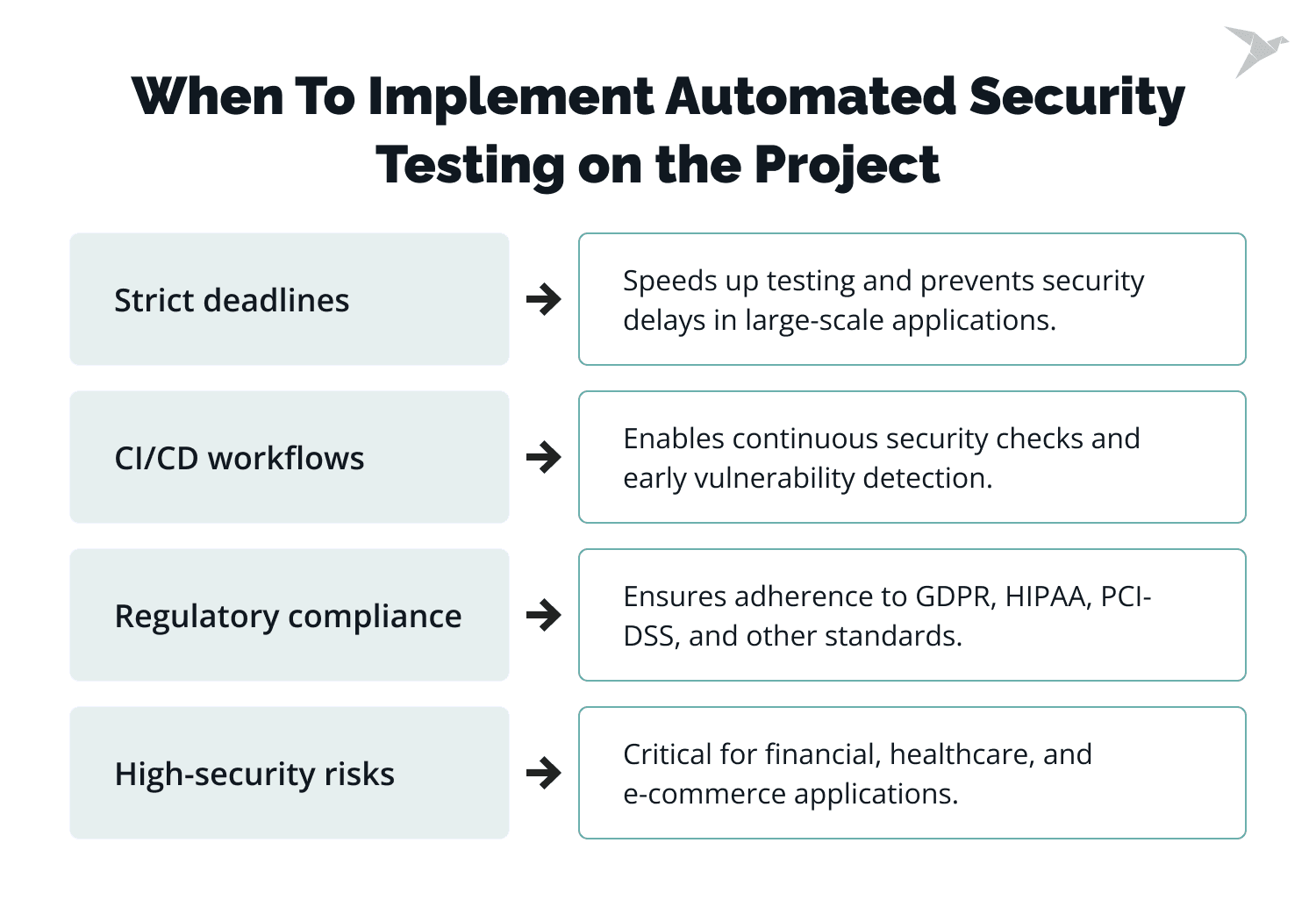
- If the project has strict deadlines, automated security testing can help accelerate the testing process and ensure that security vulnerabilities are identified and addressed quickly without delaying the project timeline, especially for projects involving complex and large-scale applications.
- If projects that follow a CI/CD approach require frequent testing to ensure security measures are in place throughout development, automated security testing can be integrated into the CI/CD pipeline to enable regular scanning of code changes and detect vulnerabilities early in the development cycle.
- If projects need to adhere to regulatory or compliance standards, such as GDPR, HIPAA, or PCI-DSS, they require thorough and regular security testing.If projects involving high-security risks, such as e-commerce platforms, financial systems, or healthcare applications, require thorough security testing, automated security testing can provide comprehensive coverage and help detect vulnerabilities that malicious actors could exploit.
Remember that automated security testing should not be seen as a replacement for manual security testing but rather as an addition. A combination of automated and manual testing can provide the most effective approach to ensuring the security of a project.
Pro Tips on Automated Web App Security Testing
Automated testing genuinely lifts an app's security posture. It finds vulnerabilities and gets them fixed before anyone exploits them. But it only pays off if you set it up well: effective, efficient, and wired into how you already develop.
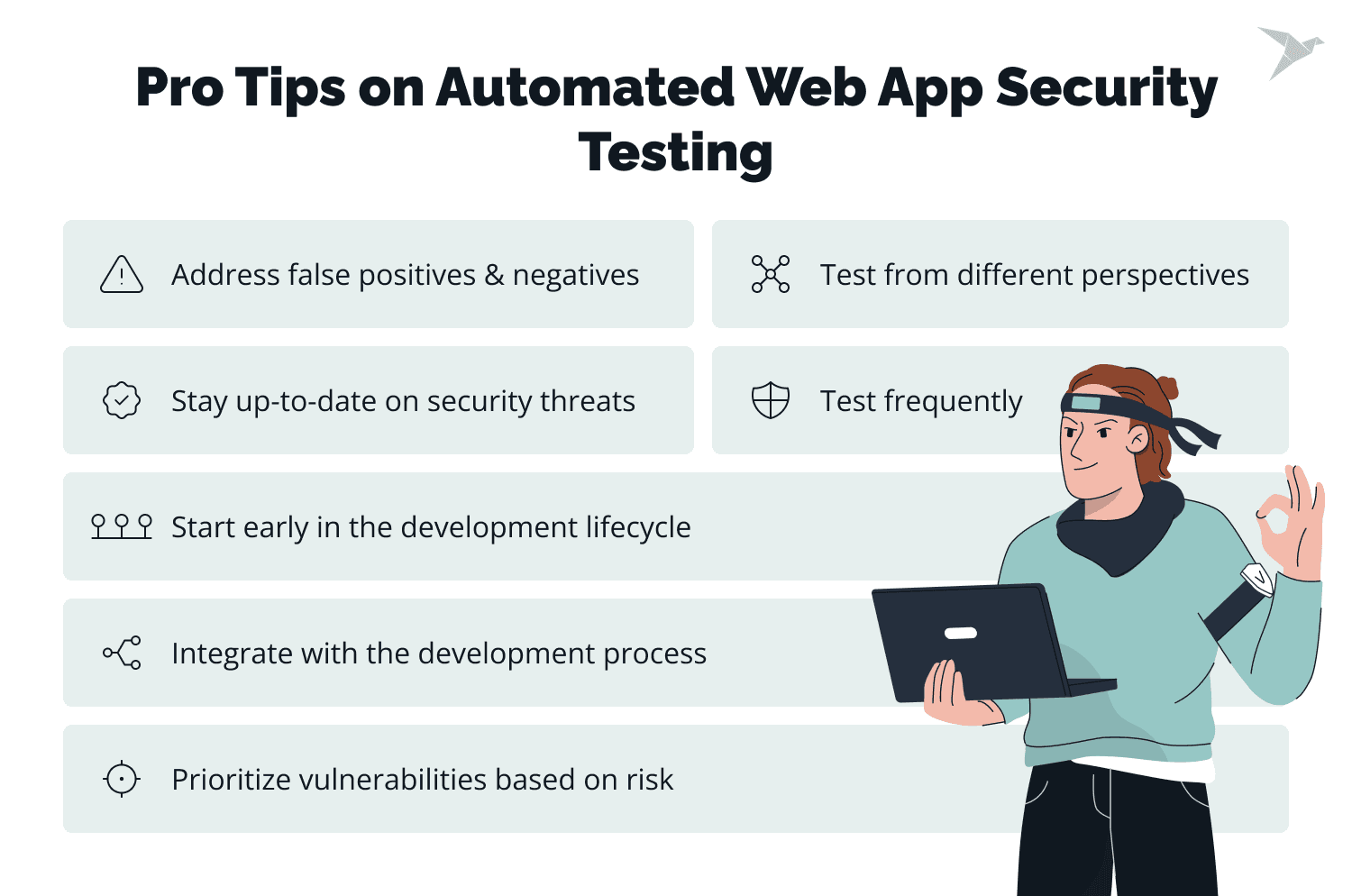
Below are the lessons we keep coming back to from the security testing services work we've delivered, worth remembering when you set up automated testing for web apps:
- Start early in the development lifecycle. The earlier security testing runs, the cheaper the weaknesses are to fix. Developers catch issues as they appear instead of after the app is already live.
- Test from different angles. No single view catches everything, so combine them. OWASP ZAP and Burp Suite Professional each run different types of testing, and together they give you a fuller picture of where the app is exposed.
- Wire it into your development process. Fold security testing into the CI/CD pipeline with tools like GitHub Actions and Jenkins, and fixes stop waiting for a separate step.
- Keep up with the threats. Tools alone aren't enough; the people running them have to track new attack vectors and techniques, and the tools and processes need regular updates to match.
- Deal with false positives and negatives. Every scanner produces some, and left unmanaged they waste time and hide real issues. Have a process for triaging them so nothing genuine slips through.
- Prioritize by risk. Not every vulnerability matters equally. Rank them by severity and business impact so the team spends its time on what actually counts first.
- Test regulary. Threats keep moving, and so does your codebase. Frequent testing catches the vulnerabilities that crept in since the last run.

Wrapping Up
With breaches in the headlines nearly every week, the old line that everything eventually gets broken feels less like cynicism and more like planning advice. Yet plenty of teams still treat security testing as an afterthought, and the vulnerabilities pile up.
Automated security testing is the more efficient, more reliable way to catch vulnerabilities in web apps, and it saves time and money over the long run. Tie your testing tools to custom report scripts or a vulnerability management system like OWASP's DefectDojo, and the whole process tightens up while the risk drops.
You get faster, more consistent detection, lower costs, and an easier path to meeting regulatory requirements. OWASP ZAP and Burp Suite are two of the tools that make that realistic.
At TechMagic, security sits at the front of how we build and test software.
FAQ

Security testing for a web application is how you identify and evaluate the vulnerabilities and threats it faces. In practice, that means penetration testing, vulnerability scanning, and secure code reviews.
Start with penetration testing, vulnerability scanning, and secure code reviews. Automated tools like OWASP ZAP and Burp Suite Pro catch the common issues fast, and manual testing digs into the business-logic flaws they miss.
Web application security testing finds and helps you fix the vulnerabilities in an app before they're used against you. That's what protects it from attacks, data breaches, and everything in between.
Runtime application self-protection (RASP) is a technology that spots and blocks threats in real time, from inside the app's own runtime. It defends against attacks like SQL injection and XSS as they happen.
Web application security testing looks for weaknesses in web-based apps. Mobile application security testing targets the risks specific to mobile, things like insecure data storage and misused permissions.