














Accessibility Audit for HealthTech Products: WCAG 2.2, WCAG-EM and the Audit Grid (+Expert Advice)
Last updated:22 September 2026


The WebAIM Million scanned the top 1,000,000 home pages in 2026 and found WCAG 2 failures on 95.9% of them, with an average of 56.1 errors per page. HealthTech products are not the exception.
Most teams already know the WCAG success criteria, but they lack a repeatable accessibility audit process. As a result, the same product can pass one audit and fail the next, depending on who ran it and what they happened to check.
A repeatable audit needs three things: WCAG 2.2 as the standard, the WCAG-EM methodology as the process, and a filled audit grid as the record everyone can act on.
Anna Cherepantseva, Product Designer at TestGorilla, has run this kind of work on a data-heavy enterprise product used by more than a million people a month.

"Findings need to be prioritized, moved into the backlog, and have clear ownership. Ideally, the team should leave it with agreed priorities and next steps, rather than having to interpret a large report on their own."
So, this guide covers which rules apply, what WCAG 2.2 changes, how WCAG-EM structures the audit, and what belongs in the grid, with Anna's audit experience throughout.
Key takeaways
- A health software accessibility audit is a structured, documented evaluation against WCAG. It is not a one-time automated scan, and not a conformance statement (ACR/VPAT).
- WCAG 2.2 adds nine success criteria to WCAG 2.1 and removes one; most current US and EU rules still name WCAG 2.1 AA as the legal baseline.
- WCAG-EM gives the audit a repeatable five-step process: define scope, explore, sample, evaluate, report.
- The audit grid makes findings actionable: screen, component, criterion, severity, clinical impact, evidence, owner, and retest status, all in one entry.
- Severity has to weigh clinical consequence alongside the WCAG conformance level. A blocked medication refill outranks a low-contrast footer even when both are AA failures.
What Is an Accessibility Audit for a HealthTech Product?
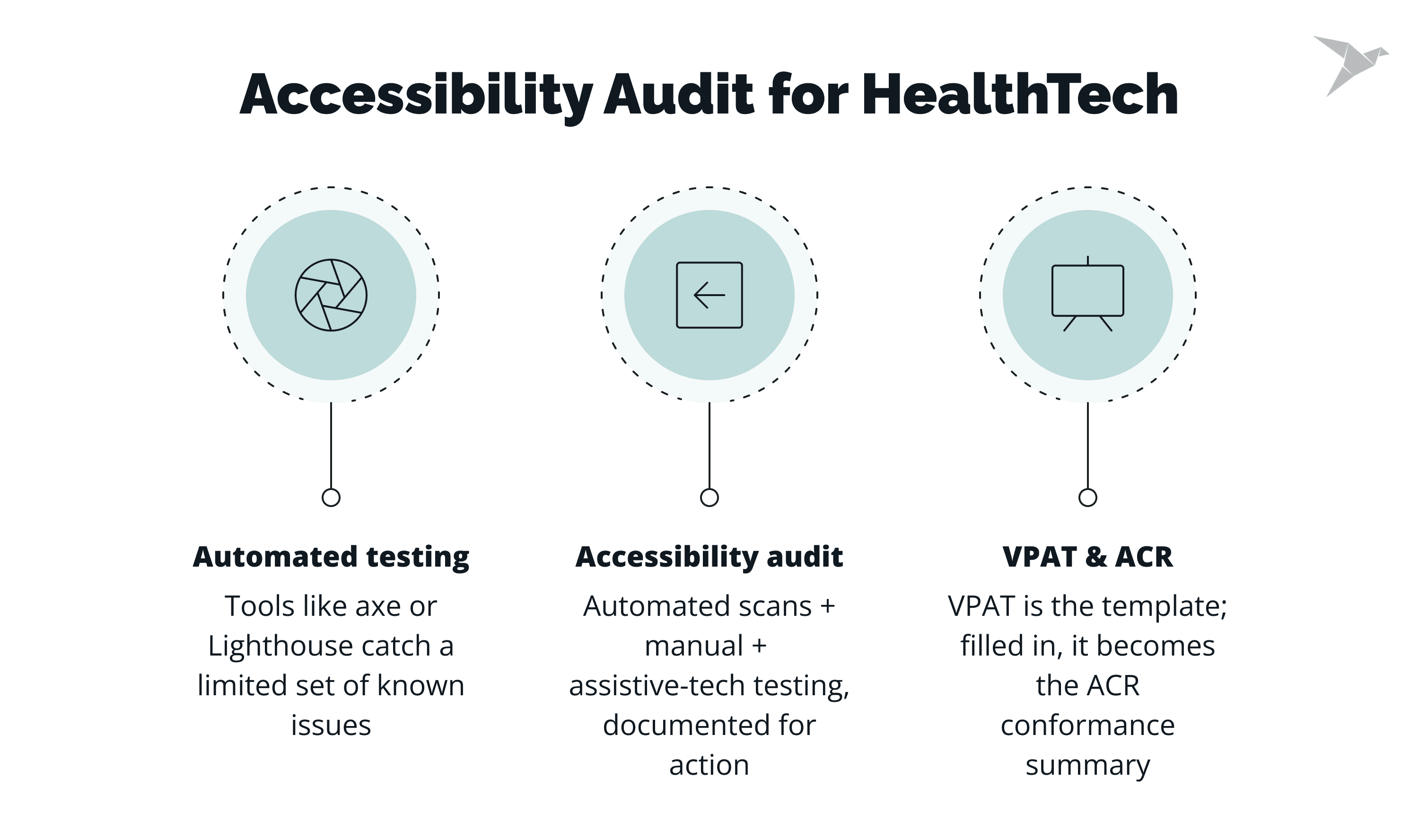
An accessibility audit is a structured evaluation against defined criteria, with documented evidence behind every finding. It is useful to distinguish an audit from automated testing and an Accessibility Conformance Report (ACR):
-
Automated testing runs a tool like axe, Lighthouse, or WAVE against the source code and flags a limited, well-known subset of real issues.
-
An accessibility audit combines automated scanning, manual testing, and testing with assistive technology, and produces a record a team can act on.
-
A VPAT (Voluntary Product Accessibility Template), a standardized template used to document a product's conformance with accessibility standards. Once completed, it becomes an accessibility conformance report (ACR) – a summary statement of the product's conformance level.
A full audit looks at the entire product, covering patient-facing digital content such as:
-
The patient portal, including account and consent flows.
-
The telehealth session flow, including live captions.
-
Clinician-facing EHR/EMR screens.
-
Native or hybrid mobile apps, including date pickers.
-
Intake and consent forms.
-
PDF remediation for discharge summaries and lab results.
-
Transactional email, such as appointment reminders.
-
Kiosks and check-in devices in a clinical setting.
Why accessibility matters for patient safety
Accessibility failures don't affect everyone equally. They fall hardest on people managing a chronic condition who depend on a screen reader, keyboard navigation, or other assistive devices, whether that means refilling a prescription or reading a lab result. Building this in from the start is what gives every patient equal access to their own care.
Anna also points to who owns what once the report lands:
"It also helps when people understand what they can influence from their role, rather than accessibility depending on one specialist. Designers can address accessibility in patterns, components, and design guidance, engineers in implementation and semantics, QA in verification, and PMs in prioritization."

Which Accessibility Standards and Rules Apply to HealthTech Products in 2026?
Which rules apply depends on who funds you, who buys from you, and which market you sell into. There is no single "HealthTech accessibility law." Instead, a set of rules each covers a different slice of the market.
A few things matter more than the table:
-
Section 508 reaches further than agencies themselves. If you sell into the VA, DoD, or IHS, your procurement process inherits it.
-
Check EU scope carefully. The EAA covers specific digital products and services across the bloc; the separate Web Accessibility Directive covers public sector organizations.
-
WCAG 2.1 AA is what US rules name; WCAG 2.2 AA is current. Auditing to 2.2 AA does not put your 2.1 AA conformance at risk; it just adds nine criteria the W3C introduced since.
A WCAG audit measures conformance and documents what to fix. It does not make a product legally compliant, and no vendor or audit firm can certify that it does.
What Does WCAG 2.2 Change for Clinical and Patient-Facing Interfaces?
WCAG 2.2 adds nine success criteria and removes one (4.1.1 Parsing); everything from 2.0 and 2.1 still applies on top.
Five of these bite hardest in HealthTech products.
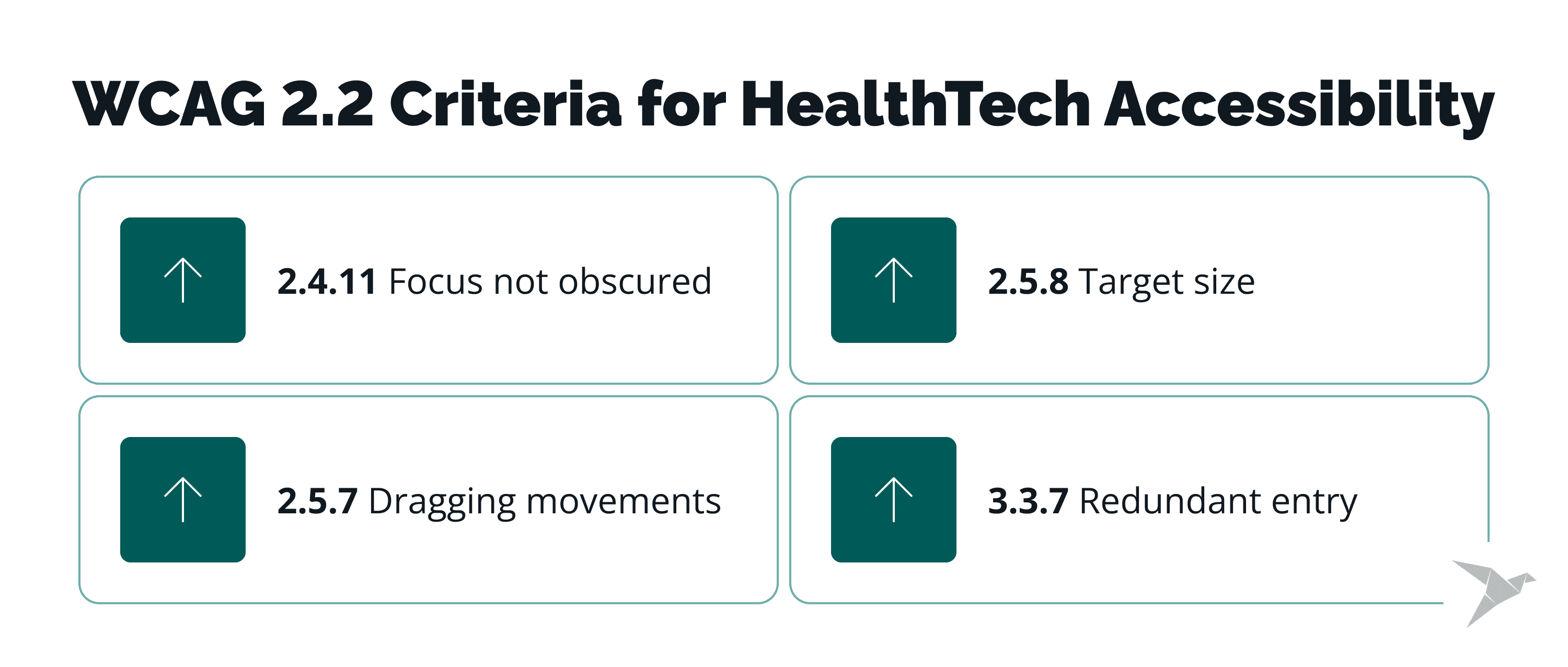
Four more criteria worth flagging
-
2.4.11 Focus not obscured (minimum): sticky headers and floating patient banners in EHR screens routinely hide the field a clinician just tabbed into.
-
2.5.7 Dragging movements: drag-and-drop care plans and triage boards need a single-pointer alternative, such as a tap or a button.
-
2.5.8 Target size (minimum): small tap targets in symptom trackers and medication logs are often used one-handed, sometimes while a patient is unwell, which makes an undersized target a real barrier rather than a cosmetic one.
-
3.3.7 Redundant entry: long intake and consent forms that repeat a question, such as an insurance ID on page one and again on page three, add friction and abandonment risk right before care starts.
3.3.8 Accessible authentication (minimum)
Patient portal logins, one-time codes, and multi-factor authentication that require remembering or transcribing a code are a common failure point. Anna Cherepantseva pointed to this criterion as tas particularly relevant for patient-facing products:
"For patient-facing products, authentication is often unavoidable, so this criterion can affect an entire entry point into the product: allow password managers and copy/paste, avoid blocking pasted verification codes, or provide alternative authentication methods."
Check our

How Do You Structure an Audit with WCAG-EM?
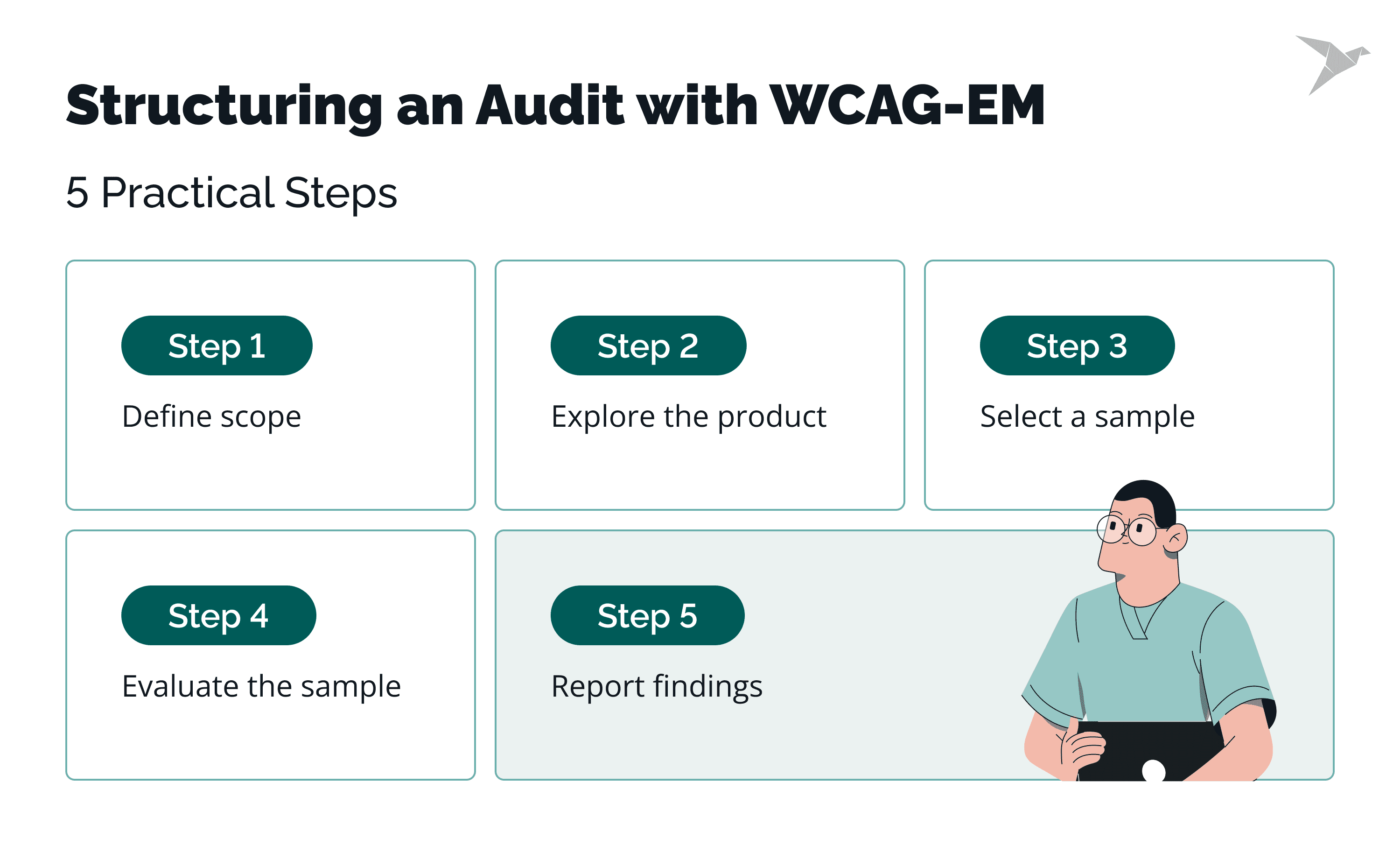
WCAG-EM (Website Accessibility Conformance Evaluation Methodology) is a W3C note that provides a repeatable five-step structure for evaluating conformance.
Step one: define the scope
State which product, which target conformance level (AA, explicitly), and which assistive technology and browser baseline the audit covers.
Step two: explore the product
Map the key views, functionality, and content types in use before sampling anything.
Step three: select a representative sample
Combine a structured sample of the views everyone agrees matter with a randomly selected sample that catches what the structured list misses.
Anna:
"Before running an audit, I define what we are trying to achieve. For example: reach WCAG AA conformance within a year, remove the most critical barriers for keyboard users, or improve accessibility of a few business-critical flows first. I wouldn't automatically start with a full-product audit. I would look at the company's priorities, available capacity, critical flows, and what the team can realistically improve afterward."
For a HealthTech product, sampling means accounting for the same component appearing in both a patient app and a clinician console, and weighting toward the highest-risk flows: medication refill, symptom triage, and consent.
Step four: evaluate the sample
Record a pass or fail per criterion, per view, with evidence and the exact steps to reproduce each failure.
Step five: report the findings
Produce an aggregated accessibility audit report plus per-issue records that a developer can act on without reopening the whole audit.
The test environment and assistive technologies
A realistic test environment covers automated tools (axe, Lighthouse, WAVE) alongside what they cannot see: screen readers (NVDA, JAWS, VoiceOver), keyboard-only navigation, 400% zoom and reflow, contrast checking, and forced-colors modes.
Automated checks catch a limited, well-documented subset of issues. Manual testing carries the rest.
What Goes into the Audit Grid?
The audit grid is the deliverable that makes an audit actionable instead of a document nobody reopens. Each finding gets its own entry, with enough detail that a developer can act on it without going back to ask questions.
Here are three example entries from a HealthTech product, showing the level of detail each one needs.
A-001: Patient portal login, one-time code field (Login flow)
Criterion: 3.3.8 Accessible Authentication (Minimum), AA. Failure: the field blocks paste, so the user must retype the code from a text message. Severity: High. Clinical impact: blocks portal access, including lab results and messages. Evidence: screen recording, NVDA plus Chrome (NVDA 2026, Windows 11). Owner: frontend lead. Fix: allow paste and autofill on the code field. Retest: not retested.
A-002: Symptom tracker, severity slider (Weekly symptom log)
Criterion: 2.5.7 Dragging Movements, AA. Failure: the slider has no single-pointer or keyboard alternative. Severity: High. Clinical impact: patients who cannot drag cannot log the data clinicians use for triage. Evidence: screen recording, keyboard-only pass. Owner: mobile team. Fix: add tap-to-set buttons alongside the drag handle. Retest: fixed, pending retest.
A-003: Clinician console, sticky patient banner (Chart review flow)
Criterion: 2.4.11 Focus Not Obscured (Minimum), AA. Failure: the banner covers the focused lab-value field when tabbing. Severity: Medium. Clinical impact: slows clinicians reviewing results mid-visit. Evidence: screen recording, keyboard-only (Windows, Chrome). Owner: frontend lead. Fix: reserve scroll padding so focus stays visible under the banner. Retest: not started.
Why human expertise still shapes the audit results
Anna:
"For each finding, I would normally include where the issue happens, how to reproduce it, the WCAG criterion, severity, who is affected and how, and a recommendation for fixing it. One thing I think is easy to miss is enough context to reproduce and understand the issue. A WCAG reference alone is not very useful if the developer still has to figure out where the problem happens, under which conditions, and what the expected behavior should be."
Ranking accessibility issues by severity for patient care
Anna:
"I wouldn't use WCAG A, AA, and AAA as a direct severity scale. They tell us about conformance requirements, but not necessarily how serious a particular failure is in the context where it happens. A useful starting point is the severity rating approach described in Jakob Nielsen's Usability Engineering, which considers both how many users are likely to encounter a problem and how seriously it affects those who do.
For healthcare, I would also consider the consequence of not being able to complete the task. The same accessibility failure can have very different implications on a marketing page and in a flow where someone is trying to access test results, understand medication instructions, or provide important health information."
A practical model borrows both ideas: rate each finding on how many users it blocks, and separately on what happens if the task fails. Define a blocker as any failure that stops a patient from completing a care-critical task with no workaround, regardless of its WCAG level.
Unclear wording can block a task as surely as a broken control, which is why UX writing practices in healthcare apps belong in the conversation about severity.
Handling evidence without exposing PHI
Audit evidence often means screenshots and recordings taken near real patient data. Protected Health Information should never go into an audit artifact: use synthetic or redacted test accounts for every recorded session, and give the grid the same access controls as any other clinical workflow record.
How Do You Make the Audit Repeatable?
An audit becomes repeatable when it is anchored in a fixed scope, a fixed sample, a written severity model, and a retest cycle. That turns it into an ongoing process instead of something that starts from scratch every time.
Cadence and triggers
Use product changes such as major releases, redesigns, and new critical flows as audit triggers, alongside an appropriate periodic cadence. A new patient-facing feature should trigger a scoped check before launch.
Fix at the design-system level
If the same component appears in a patient app and a clinician console, one fix should close every place that component is used.
Anna:
"If the same issue can appear in multiple places, I would try to fix it higher up rather than fixing every instance separately. For example, if the problem comes from a shared component, I would fix it in the design system and update its accessibility guidance. The same applies to feature-level requirements: if keyboard access, focus behavior, or error handling is important for a feature, I would include it in the acceptance criteria."
There is a good reason to make these fixes systemic: in the WebAIM Million 2026, only six categories accounted for 96% of all automatically detected accessibility errors, and the same six categories have remained the most common for seven years.
Automated checks as a regression net
Run automated scans in CI to catch regressions between audits. This works as a regression net; manual testing still catches what automation misses. Reuse the previous audit's sample as a baseline, so a re-audit checks whether fixed issues stayed fixed and whether new ones appeared.
Own the grid, and define "done"
A ticket is done when the fix is retested against the same criterion, on the same assistive technology, with the result logged back in the grid. Assign a single owner for the grid itself, distinct from whoever owns individual fixes, and update the ACR/VPAT whenever findings change so it never drifts out of sync with the product.
What Do Teams Get Wrong When Auditing HealthTech Products?
Two mistakes are worth highlighting in Anna Cherepantseva's experience, and both are avoidable with a small process change.
Relying on automated accessibility testing first
As Anna puts it:
"One thing I see quite often when teams want to improve accessibility but don't know where to start is reaching immediately for an automated accessibility score. Automation is useful, especially for finding common issues at scale, but it isn't the same as testing whether somebody can actually use the product."
In WebAIM's survey of accessibility practitioners, 34.7% said automated testing detects 20–30% of accessibility issues in their experience, and only 17.6% said it can detect 50% or more.
Do instead: treat an automated score as a starting inventory, and budget manual testing time into the same sprint rather than as a follow-up that gets cut when the schedule slips.
Treating the audit as a one-time snapshot
The most common misunderstanding is about timing:
Anna:
"An accessibility audit is only a snapshot of the product at a particular point in time. A product can be audited, have the identified issues fixed, and start accumulating the same problems again in future releases. The work after the audit matters just as much."
Do instead: fold the cadence and design-system fixes from the section above into the team's regular process, not into a once-a-year vendor engagement.
Where TechMagic Fits Into Your Digital Accessibility Work
TechMagic has built healthcare products for 11+ years, with 200+ projects delivered and a 92% client NPS. Our HealthTech clients include Huckleberry Labs, Tiro Health, MHC Healthcare, and Generated Health.
Our in-house accessibility lead, Sviatoslav Nytka, holds a medical degree and has studied accessibility and rehabilitation science alongside six-plus years in UX. That combination shows up in how our team scopes an audit for a clinical workflow rather than a marketing page.
We audit against WCAG, produce the grid, remediate findings, retest, and keep the report current as the product changes. We do not issue legal ADA-compliance certification, and no audit or platform can guarantee legal compliance on our behalf or yours. That determination sits with your own counsel.

Final Thoughts
An accessibility audit for a HealthTech product rests on three fixed pieces: the web content accessibility guidelines (WCAG) 2.2 as the standard, WCAG-EM as the process, and the audit grid as the record that survives past the audit itself. Add a severity model for clinical consequence, and the same audit helps different evaluators apply a more consistent process.
The CDC estimates that one in four U.S. adults live with a disability, so a HealthTech product that isn't accessible is shutting out a meaningful share of the people it's meant to serve. A comprehensive audit, one that pairs automated scanning with human review, is how a team gets an honest picture of where it stands, since manual audits consistently catch what automated tools miss.
Where is this heading?
Regulatory pressure isn't slowing down. The EAA has been enforceable across the EU since June 28, 2025, and Section 504 and ADA Title II, the disabilities act provisions covering federally funded and government digital services in the US, both reach their final phased deadlines in 2027 and 2028.
Teams that fold healthcare accessibility audits into their accessibility goals now, rather than treating them as a one-time compliance exercise, are the ones positioned for reduced compliance risk when those deadlines land, instead of a scramble in the final quarter.
Expect accessibility requirements to keep tightening, not loosening: WCAG itself is still evolving (2.2 added nine criteria in 2023, and more are already in draft), and enforcement bodies on both sides of the Atlantic have a track record of extending deadlines, not requirements. For HealthTech specifically, that means treating an audit less like a hurdle to clear once and more like an ongoing practice, the same way security reviews or performance budgets are ongoing.
Teams that build a relationship with accessibility experts, whether in-house or through outside audit services, and bake retesting into every release cycle are the ones who get measurably closer to a fully accessible product with each cycle, instead of rediscovering the same six WebAIM Million error categories every year.

FAQ

An accessibility audit for health software is a structured evaluation of a HealthTech product against WCAG, with documented evidence behind every finding. Web accessibility audit differs from an automated scan, which catches only a limited subset of issues, and from a conformance report, which summarizes results rather than producing them.
WCAG-EM breaks digital accessibility audit for healthcare organizations into five steps: define the scope and target conformance level, explore the product's key views, select a representative sample, evaluate that sample against each criterion, and report the findings in a structured grid.
WCAG 2.2 adds nine success criteria on top of WCAG 2.1 and removes one. Current US federal rules still name WCAG 2.1 AA as the legal baseline, but auditing to 2.2 AA does not put 2.1 AA conformance at risk, since everything from 2.1 still applies.
No. It measures conformance against WCAG and documents what to fix. TechMagic audits and remediates to WCAG to improve your accessibility efforts and remove accessibility barriers; a legal compliance position and regulatory compliance are questions for your own counsel, not for an audit report.